(Updated: 4/30/2026)
What are email phishing scams?
The term “phishing” is a play on the word “fishing,” as cybercriminals bait users with phony emails and websites to get information.
- Phishing scams have increased by over 85% in the past year, with AI tools leading the charge with more sophisticated attacks.
- The FBI’s Internet Crime Complaint Center reports losses in excess of $30 million to phishing schemes in one year.
The endgame of an online phishing exhibition is to extort your money. It usually starts with an email that looks legitimate, with an ominous warning that your account has been hacked or heralding an offer that’s too good to be true. The email provides convenient links that take you to what appears to be the company’s website. However, the website is a clever fake that usually includes forms to collect passwords, Social Security numbers, and other personal information. The online crooks use this data to hack your accounts, steal your online identity, and take your hard-earned cash.

What is Phishing?
Phishing is a cybercrime where attackers use fake emails to steal personal information like passwords and credit card details.
To get a better understand of phishing, we need to look at how it started.
In the 1990s, when the internet was young and innocent, America Online (AOL) brought electronic mail to the masses. A computer pronouncing “you’ve got mail” heralding the arrival of an email was part of the 90s tech soundtrack, along with the beep and hiss of a modem. The 1998 movie “You’ve Got Mail” cemented the phrase into the culture of the era.
As the top service provider in the early days of the internet, AOL became a prime target for cybercriminals. So, AOL users became some of the first victims of a major phishing attack. Scammers began by stealing users’ credentials and using algorithms to generate random credit card numbers. They used these fake credit cards to create new accounts, which were then employed to spam other AOL users via email.
Most of these fraudulent messages asked users to verify their accounts or confirm billing information. Because phishing was not widely known at the time, many people fell for these scams. To address this, AOL eventually added warnings to its email and instant messaging services to prevent users from sharing sensitive information via these channels.
To this day, online scammers love email, and email phishing remains one of their favorite ways to steal your money and personal information. But can you spot a phony phishing email? Here are some ways to help you avoid taking the bait from an email phishing scam.
Spotting Phishing Emails
Online scammers are smart and constantly updating their tactics, but there are signs that will help you recognize phishing emails.
- It’s not personal: The email is not addressed to the recipient. It often starts with “Dear Customer”. A Netflix email scam opened with “Hello Dear”. That’s bold!
- Grammatical errors: Spam filters often block keywords and phrases commonly found in phishing emails. The misspelling is intended to bypass the filter and ensure the email lands in your inbox.
- Bad links: Phony links are the hooks in the phishing scheme. The best defense against phishing scams is to NEVER click links in emails.
Trends in Phishing Tactics
Phishers constantly evolve tactics, making staying informed about the latest trends crucial.

Spear Phishing
Unlike traditional phishing, which targets a broad audience, spear phishing is highly targeted.
Scammers research their victims and craft personalized emails that appear to come from trusted sources, such as colleagues or business partners. These emails often contain malicious links or attachments designed to steal sensitive information. For example, you get an email from your bank saying your account has been compromised. They provide a link to rectify the situation. Never click on this link. Instead, access your bank account as you usually do, and do not use anything from the suspicious email. You’ll most likely find there is no issue with your account.
Vishing (Voice Phishing)
Vishing involves scammers using phone calls to trick individuals into revealing personal information. To gain your trust, they might pose as tech support, bank representatives, or even government officials. Always verify the caller’s identity before sharing any information.
Smishing (SMS Phishing)
Smishing uses text messages to lure victims into clicking on malicious links or providing personal information. Be cautious of unsolicited texts, especially those that urge immediate action or ask for sensitive data.
Tools to Combat Phishing
Fortunately, technological advancements have led to the development of tools that can help identify and prevent phishing attacks. Consider implementing these solutions to enhance your security.
Spam Filters
Advanced spam filters use machine learning to detect and block phishing emails before they reach your inbox.
Email Authentication Protocols
Technologies like DMARC, SPF, and DKIM help verify the sender’s identity and ensure the email hasn’t been tampered with. To implement this measure, you will need the help of someone with technical knowledge of DNS. Contact TecAdvocates for assistance.
Anti-Phishing Software
These programs continuously scan for phishing threats and provide real-time alerts when suspicious activity is detected.
Frequently Asked Questions
1. What is email phishing?
Email phishing is a cybercrime in which attackers send fake emails to trick recipients into revealing sensitive information such as passwords, credit card details, or Social Security numbers. These emails often mimic legitimate organizations and include links to fraudulent websites.
2. How can I recognize a phishing email?
Phishing emails often have telltale signs, such as:
- Generic greetings like “Dear Customer” instead of your name.
- Grammatical errors or unusual phrasing.
- Links that don’t match the official website of the sender. Always hover over links to verify their destination before clicking.
3. What are some common phishing tactics?
- Spear Phishing: Highly targeted emails that appear to come from trusted sources.
- Vishing: Phone calls from scammers posing as tech support or officials.
- Smishing: Text messages urging immediate action or requesting sensitive data.
4. What tools can help prevent phishing attacks?
- Spam Filters: Use advanced filters to block phishing emails.
- Email Authentication Protocols: Implement technologies like DMARC, SPF, and DKIM to verify email senders.
- Anti-Phishing Software: These tools scan for threats and provide real-time alerts.
Join the Fight – Report Phishing Emails
Here’s your chance to get back at those online bullies for polluting your inbox with contaminated email.
- Forward the email to the Anti-Phishing Working Group at [email protected]
- Report the phishing attack to the FTC at ftc.gov/complaint
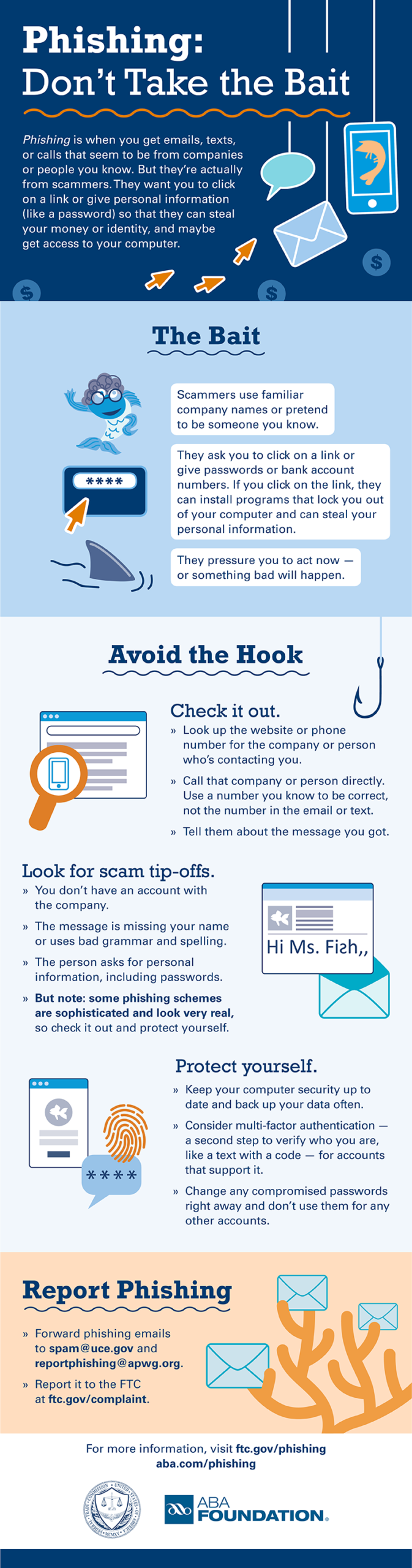


[…] Email Phishing Scams – Don’t Take the Bait […]